Updated October 2026
Roblox regional pricing on gamepasses
Roblox now changes a pass’s price per country by default. Great for selling in your game, but it breaks a payout at one exact price. Here’s how to switch it off.
What regional pricing is
Regional pricing lets Roblox show a lower price to players in countries where Robux are worth more to them. Roblox decides a buyer’s economic location from signals like VPN use, billing history and account history, and keeps the regional price between 30% and 100% of the price you set.
It is now part of Managed pricing, which also runs price tests: for a while, different groups of players can see different prices around the one you set. Roblox switches regional pricing on by default for all new and existing passes.
Why it makes a withdrawal fail
FarmRBX pays you by buying your gamepass at the exact price the Withdraw page shows; that price covers Roblox’s fee so you receive the full amount. With Managed pricing on, the price Roblox charges can be different from the one you set, so the purchase doesn’t match and the withdrawal fails. Your Robux go back to your FarmRBX balance. The Withdraw page reminds you to turn it off, and tells you when the pass you picked still has Managed pricing on.
How to turn it off for one pass
Open Creator Hub
Go to create.roblox.com, open Creations and pick the game your pass belongs to.
Go to the pass
Open Monetization, then Passes, and click the pass.
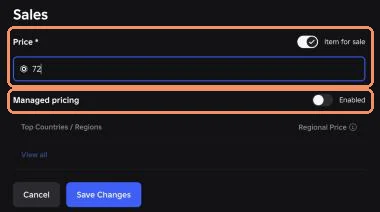
Turn Managed pricing off
In the pass’s Sales settings, switch Managed pricing off (Roblox also calls this Disable Managed Pricing).
Check the list
Back under Passes, the pass shows Disabled under Managed pricing. It is set per pass, so do this for each pass you use.

Keep it on for your other passes?
For passes you sell to players in your own game, Managed pricing can help: Roblox reports more paying players in countries like Brazil, the Philippines and Mexico since regional prices for passes started. Only the pass you withdraw to needs a fixed price. A simple setup is one pass called “Withdrawal” with Managed pricing off, used only for FarmRBX.
New to passes? Our gamepass guide shows every step with screenshots, and the Pending Robux guide explains what happens after the sale.
Frequently asked questions
Is regional pricing on for my gamepass?
Probably. Roblox says regional pricing is enabled by default for all new and existing passes, through Managed pricing. Check the Managed pricing column under Monetization → Passes in Creator Hub.
How much cheaper can a pass get?
Roblox keeps regional prices between 30% and 100% of the price you set: never more than 70% off, and never above your price.
Does a VPN get me the cheaper price?
Roblox works out a buyer’s economic location from signals such as VPN use, billing history and account history, not just the IP address. If it can’t tell, the buyer sees the normal price.
Do I have to turn it off for every pass in my game?
No, only for the pass you use to withdraw from FarmRBX. Your other passes can keep Managed pricing; Roblox says regional prices brought more paying players in several countries.
Why did my FarmRBX withdrawal fail?
FarmRBX buys your pass at one exact price. With Managed pricing on, the price Roblox charges can differ, so the purchase doesn’t go through. Your Robux go back to your FarmRBX balance; turn Managed pricing off and try again.
Pass ready? Withdraw your Robux
Withdraw from 7 R$ to your own Roblox account. The Withdraw page tells you the exact price to set.