Updated October 2026
How to make a gamepass on Roblox
A gamepass is how Robux reach your account: FarmRBX buys the pass you made. These are the steps in Roblox Creator Hub as they look in October 2026, tested on a brand-new account.
What you need
A Roblox account
Any account works. We made every screenshot here on a brand-new account without Premium.
A public game of your own
An empty Baseplate is enough. Nobody has to play it: it only holds your pass.
Roblox Studio, once
Creator Hub sends you to Studio to make a game. After the first publish, everything happens in your browser.
About ten minutes
The first time. A pass you already have takes a few seconds: you only change its price.
Step 1: Publish a game in Roblox Studio
A gamepass always belongs to a game, so you need one first. On a new account Creator Hub has none, and its only button is Create in Studio. Install Roblox Studio from there and sign in with the same account.
- In Studio, choose New → Baseplate. An empty map is all you need.
- Choose File → Publish, give the game a name and a genre, and click Save.
- You can close Studio. The game now shows under Creations in Creator Hub.
Step 2: Make the game public
A new game is visible only to you. FarmRBX only lists public games, so this step is the one most people miss. Roblox first asks you to rate the game's content.
- Open Creator Hub, go to Creations and click your game.
- Open Publish settings → Content rating and click Start.
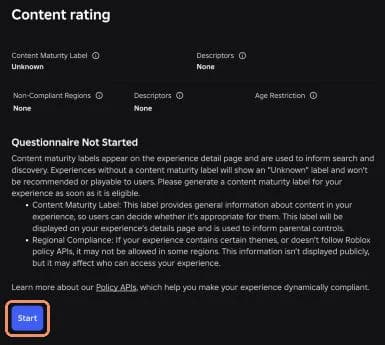
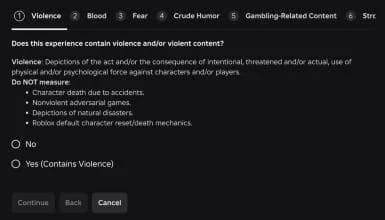
- Answer each question about your game honestly: violence, blood, fear, gambling, chat and so on. For an empty Baseplate the answer is No every time.
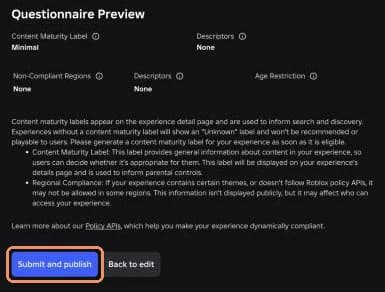
- Click Preview rating, check it (an empty game gets Minimal) and click Submit and publish.
- Release the game to players. Roblox does this from Studio: choose File → Publish again and follow the release steps (Roblox's guide). Roblox can ask for extra checks on new accounts; if it won't let you release a game, use a public game you already have.
Step 3: Create the gamepass
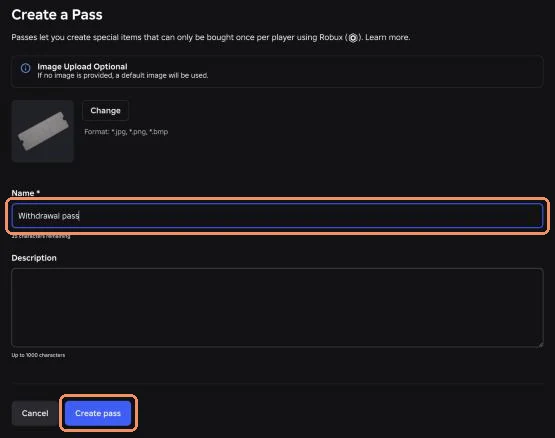
- In your game in Creator Hub, open Monetization → Passes and click Create Pass.
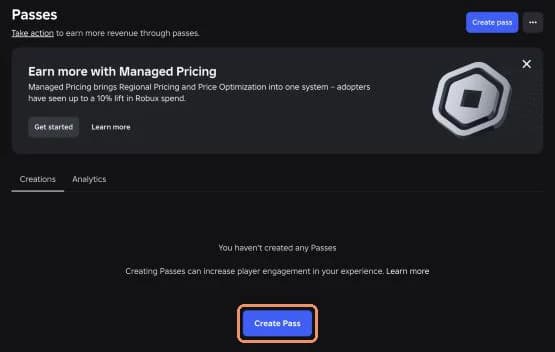
- Type a name, for example Withdrawal pass. The image and description are optional: without an image Roblox uses a default one.
- Click Create pass. It appears in the list as Offsale: nobody can buy it yet.
Step 4: Put it on sale at the right price
- Click the pass in the list, then Sales on the left.
- Turn on Item for sale and type the price in the Price field.
- Leave Managed pricing off, then click Save Changes.
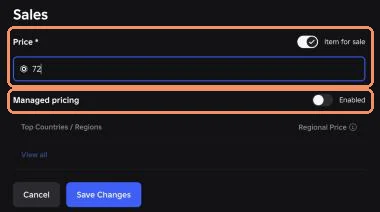
Back in the list, the pass now shows its price and Disabled under Managed pricing. That is what FarmRBX needs.

Why Managed pricing must stay off
Managed pricing combines Roblox's regional pricing and price tests: buyers in some countries see a lower price, and Roblox may try other prices on your pass. FarmRBX buys at one exact price, so with Managed pricing on the purchase does not match and the withdrawal fails. It is set per pass, so check it on the pass you use.
Which price to set
Roblox keeps 30% of every gamepass sale, so the price has to be higher than the Robux you want. FarmRBX covers that fee: the Withdraw page tells you the exact price for your amount. Always copy that number. Some examples:
| You withdraw | Set the gamepass price to |
|---|---|
| 7 R$ | 10 R$ |
| 50 R$ | 72 R$ |
| 100 R$ | 143 R$ |
| 200 R$ | 286 R$ |
| 500 R$ | 715 R$ |
Want to work it out yourself? The Robux tax calculator shows the price for any amount.
Step 5: Withdraw on FarmRBX
- Open Withdraw, enter how many Robux you want (from 7 R$) and pick your game under Select a game.
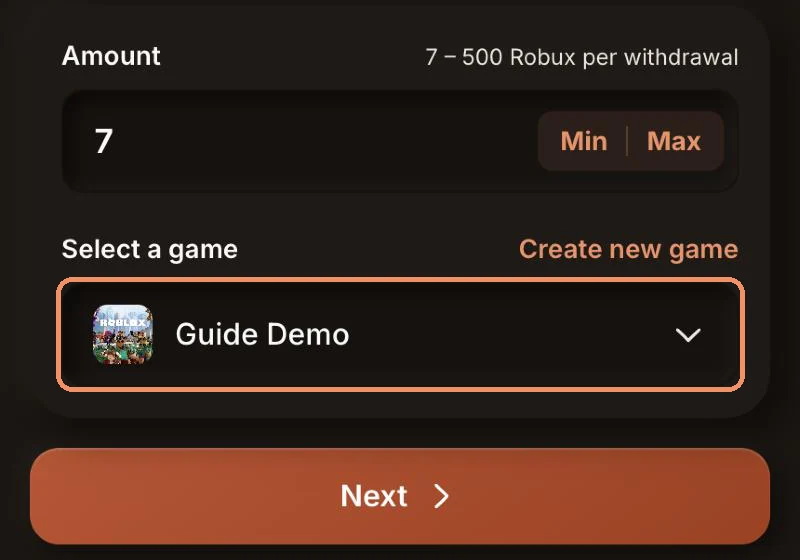
- Click Next. The page shows the exact price, and Open on Roblox takes you straight to your game's Passes page.
- Set your pass to that price (step 4), come back and click Withdraw.
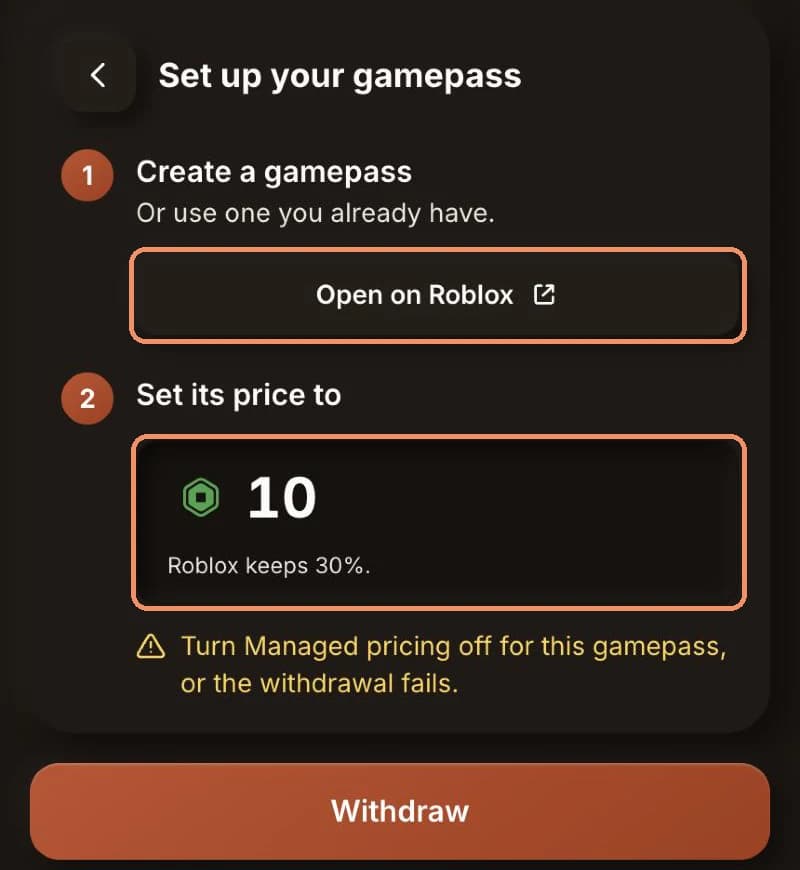
- FarmRBX buys the pass. Roblox shows the Robux as pending for a few days, then you can spend them. The payouts guide explains the rest.
If the withdrawal fails
- No public games found: the game is not public yet. Do step 2, wait a minute and try again.
- Managed pricing is on: turn it off on the pass's Sales page.
- The price is off by even 1 Robux: copy the price from the Withdraw page again. Don't round it.
- The pass says Offsale: turn on Item for sale and save.
A failed withdrawal costs you nothing: the Robux go back to your FarmRBX balance automatically and you can try again once the pass is fixed.
Frequently asked questions
Do I need Roblox Premium to make a gamepass?
No. We created this guide’s pass and put it on sale on a new account without Premium. Roblox keeps 30% of every sale either way.
Does my game need players or a real map?
No. A gamepass needs a published, public game to belong to, but the game can be an empty Baseplate that nobody visits.
Can I use the same gamepass for every withdrawal?
Yes. Open its Sales page, change the price to what the Withdraw page shows this time and save. There is no need to make a new pass each time.
What is Managed pricing, and why turn it off?
Managed pricing lets Roblox set prices per country and test other prices for you. A buyer may then see a different price than the one you set, so FarmRBX cannot buy your pass at the exact price and the withdrawal fails.
Why does FarmRBX say "No public games found"?
FarmRBX only lists games that are public on Roblox. Make sure your game is published and released (step 2), then try again.
When can I spend the Robux?
Roblox holds Robux from gamepass sales as pending for a few days. You can follow them under Pending Robux in your Roblox transactions.
Your gamepass is ready
Earn Robux with games, surveys and app offers, and withdraw to your own gamepass from 7 R$.